Automation

TradingView to TradeLocker Trade Copier

Integrate TradingView with TradeLocker to automate your trading alerts instantly. Our cloud-based webhook copier captures TradingView alerts and executes them on your TradeLocker prop firm or broker accounts in under 20ms. No VPS required, no complex JSON formatting—just paste your webhook and trade.

Experience effortless automation for Pine Script strategies and indicator alerts. Whether you're trading with FTUK, FundedNext, E8 Funding, or any of the 200+ prop firms using TradeLocker, Copygram handles Open, Modify, and Close actions automatically with AI-powered precision.

Experience effortless automation for Pine Script strategies and indicator alerts. Whether you're trading with FTUK, FundedNext, E8 Funding, or any of the 200+ prop firms using TradeLocker, Copygram handles Open, Modify, and Close actions automatically with AI-powered precision.

How It Works (Step-by-Step Guide)

How to Connect TradingView Alerts to TradeLocker

How to Connect TradingView Alerts to TradeLocker

Forget complicated JSON coding and 200ms execution delays. Copygram uses direct cloud APIs to connect your TradingView alerts to your TradeLocker accounts instantly.

How It Works (Step-by-Step Guide)

How to Connect TradingView Alerts to TradeLocker

Forget complicated JSON coding and 200ms execution delays. Copygram uses direct cloud APIs to connect your TradingView alerts to your TradeLocker accounts instantly.

Connect Tradelocker account
Connect MT4 to Copygram. Direct connection. No EA

1

Connect Your TradeLocker Account

Connect Your TradeLocker Account

~1 min

Add your TradeLocker broker or prop firm credentials in the Copygram dashboard. We support all TradeLocker environments—simply select your server, enter your details, and you're connected securely via official APIs.

2

Copy Your Webhook URL

Copy Your Webhook URL

~1 min

Create a new Room in Copygram, select TradingView as the sender and TradeLocker as the receiver. Copygram will instantly generate a unique webhook URL for your connection.

Generate Webhook
connect Telegram to Copygram
paste webhook url to Tradingview
Set receiver settings in Copygram

3

Paste into TradingView

Paste into TradingView

~1 min

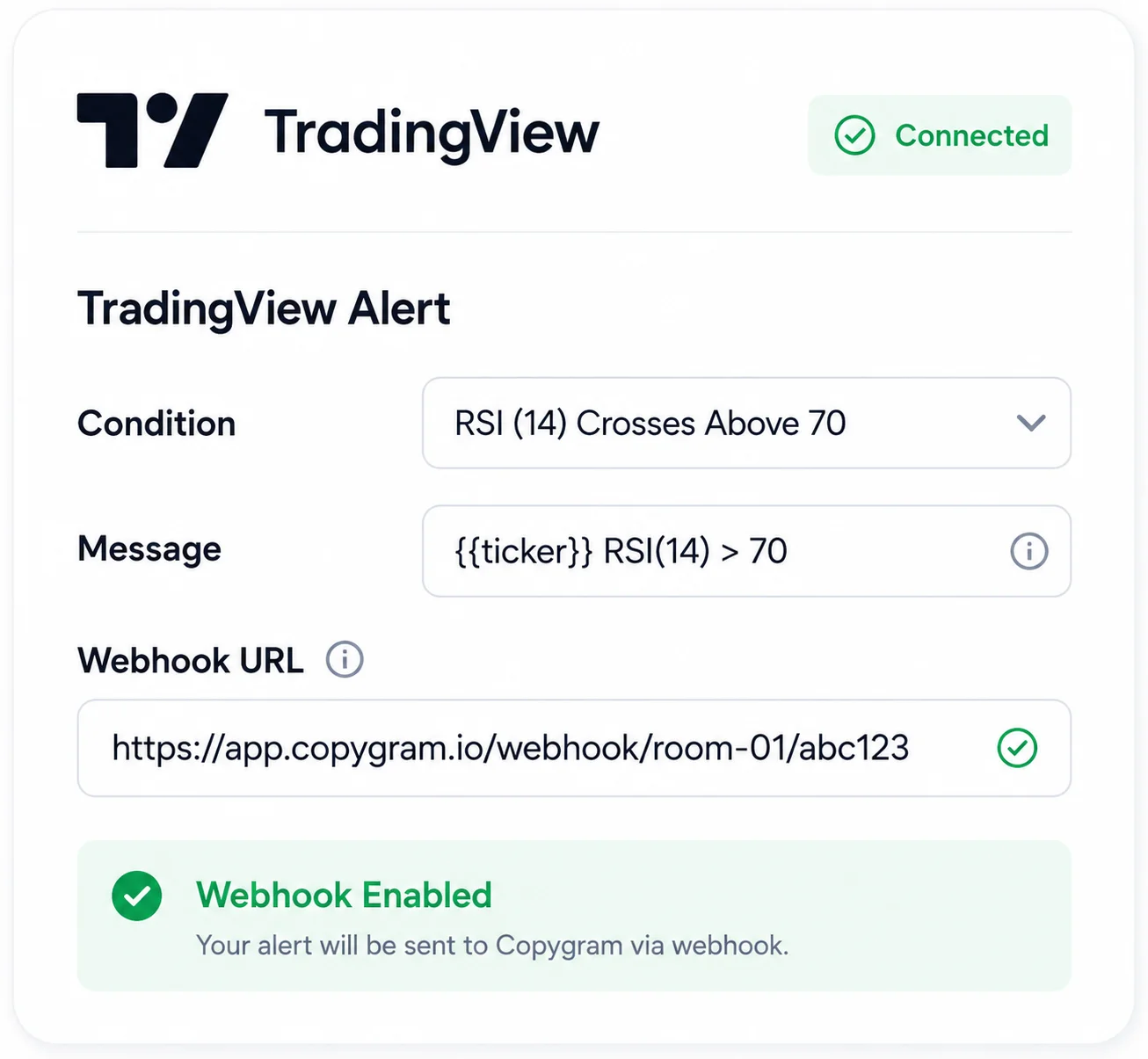
Open your TradingView chart, create an alert on your favorite indicator or Pine Script strategy, and paste the Copygram webhook URL into the Notifications tab. Your alerts will now execute automatically in under 20ms.

Connect Tradelocker account

1

Connect Your TradeLocker Account

~1 min

Add your TradeLocker broker or prop firm credentials in the Copygram dashboard. We support all TradeLocker environments—simply select your server, enter your details, and you're connected securely via official APIs.

2

Copy Your Webhook URL

~1 min

Create a new Room in Copygram, select TradingView as the sender and TradeLocker as the receiver. Copygram will instantly generate a unique webhook URL for your connection.

Generate Webhook
paste webhook url to Tradingview

3

Paste into TradingView

~1 min

Open your TradingView chart, create an alert on your favorite indicator or Pine Script strategy, and paste the Copygram webhook URL into the Notifications tab. Your alerts will now execute automatically in under 20ms.

AI Parsing

No Strict JSON Required: AI-Powered Alert Parsing

Other copiers force you to write complex JSON code or strict syntax like "Buy EURUSD Q=0.1". If you make one typo, your trade fails. Copygram uses advanced AI to understand your TradingView alerts in plain English, Pine Script, or JSON.

Plain Text (Easiest)

Example: Buy 1 lot of EURUSD at market. Set Stop Loss at 1.0850 and Take Profit at 1.0950.

Pine Script Variables

Example: {{strategy.order.action}} {{ticker}} Q={{strategy.position_size}}

Standard JSON

Example: {"action": "buy", "symbol": "EURUSD", "volume": 1.0}

Our AI instantly maps the symbol, calculates the lot size based on your TradeLocker risk settings, and executes the trade flawlessly.

Features

Advanced TradingView to TradeLocker Automation Features

Discover how our TradingView Alerts to TradeLocker integration enhances your trading experience.

Comprehensive Money and Risk Management Control

Manage your TradeLocker prop firm evaluations safely. Choose from fixed lot sizes, multipliers, or percentage risk balance to tailor your approach. Protect your drawdown limits by deciding exactly how Stop Loss (SL) and Take Profit (TP) levels are copied from TradingView.

Account Balance Risk

Take Profit Settings

Lot Multiplier

Percentage Risk

Stop Loss Management
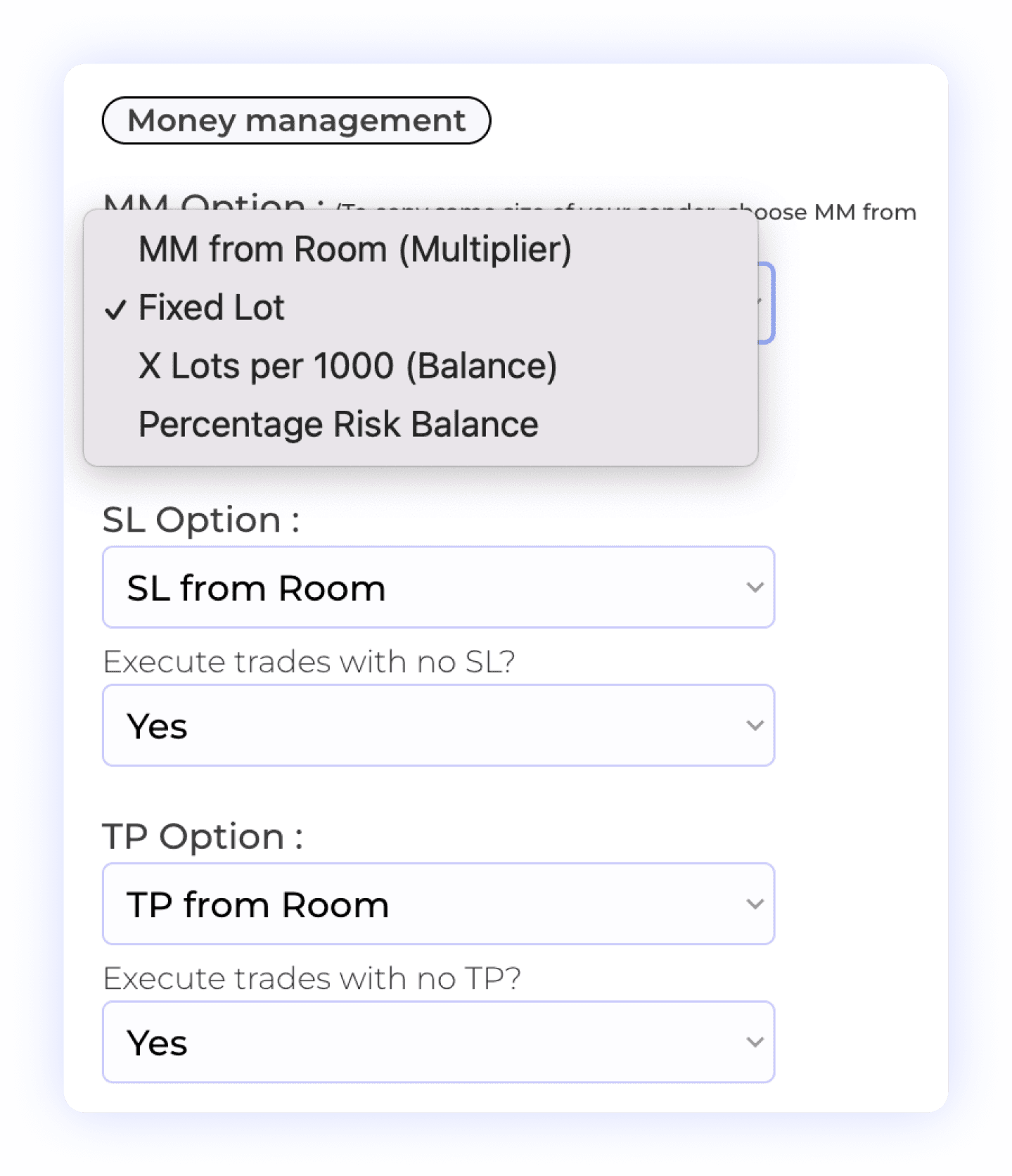
Comprehensive Money and Risk Management Control
Smart Prefixes & Suffixes Management

Smart Prefixes & Suffixes Management

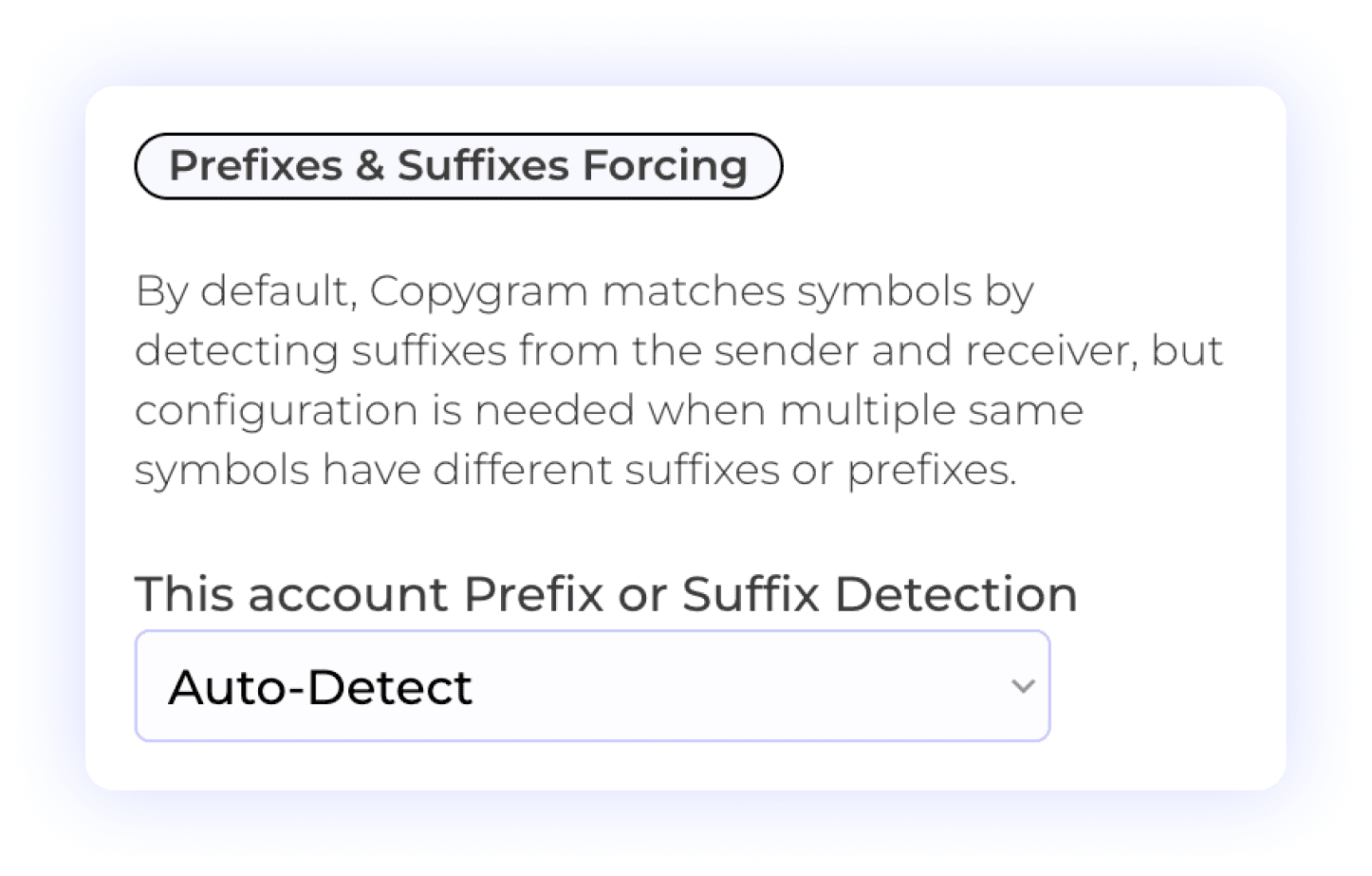
TradeLocker brokers often use different symbol naming conventions (like EURUSD.pro or BTCUSD.raw). Copygram automatically detects and maps these prefixes and suffixes on your receiver accounts, ensuring your TradingView alerts always find the right instrument.

Prefix Management

Suffix Management

Automated Detection

Precision Symbol Matching

TradingView symbols don't always match TradeLocker instruments perfectly. Our Specific Symbols Matching feature allows you to custom-map symbols (e.g., mapping TradingView's "US30" to TradeLocker's "WS30" or "DJI"), guaranteeing accurate execution across any prop firm.

Custom Symbol Matching

Different Symbol Formats

User Control
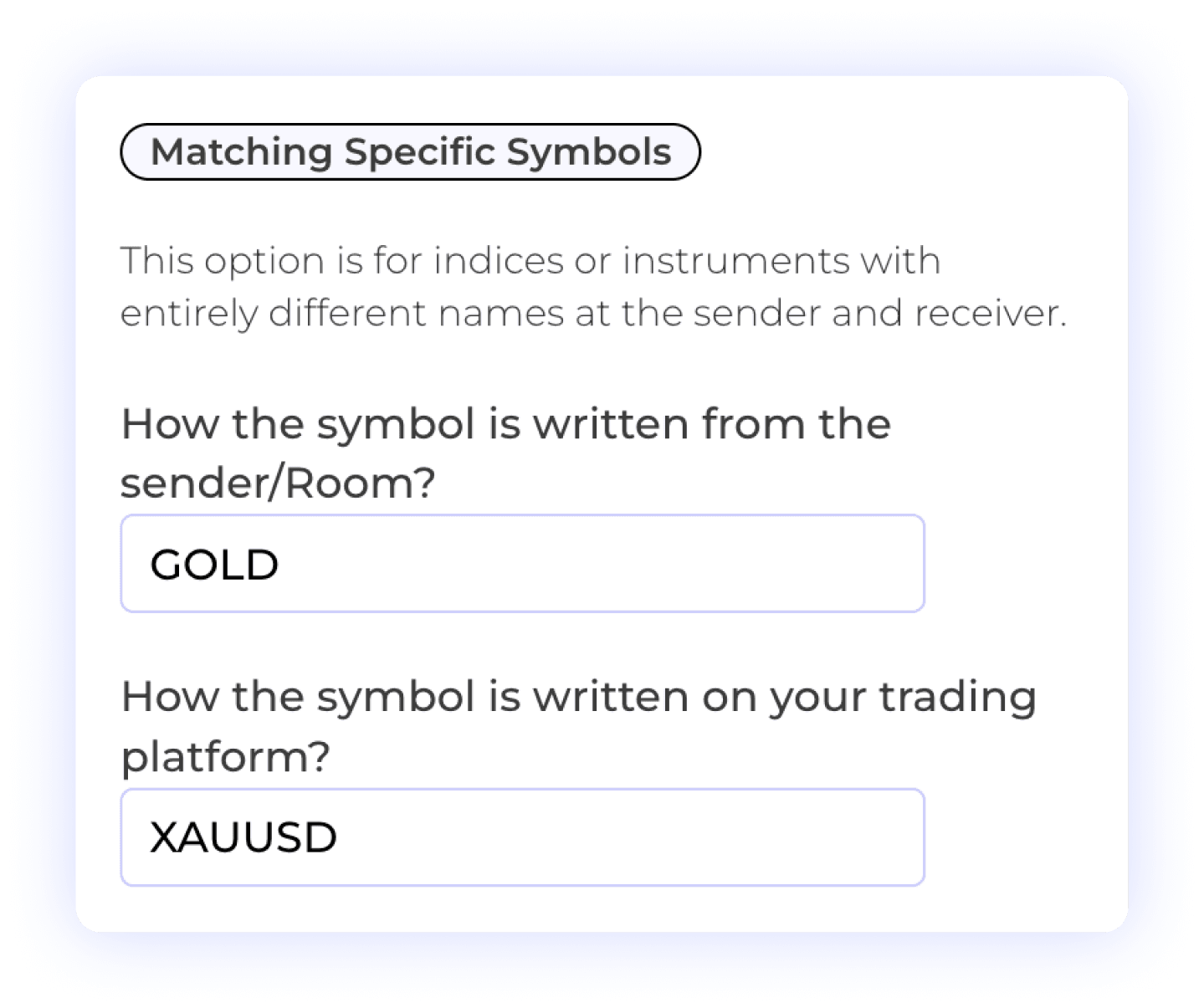
Precision Symbol Matching
Customizable Order Management

Customizable Order Management

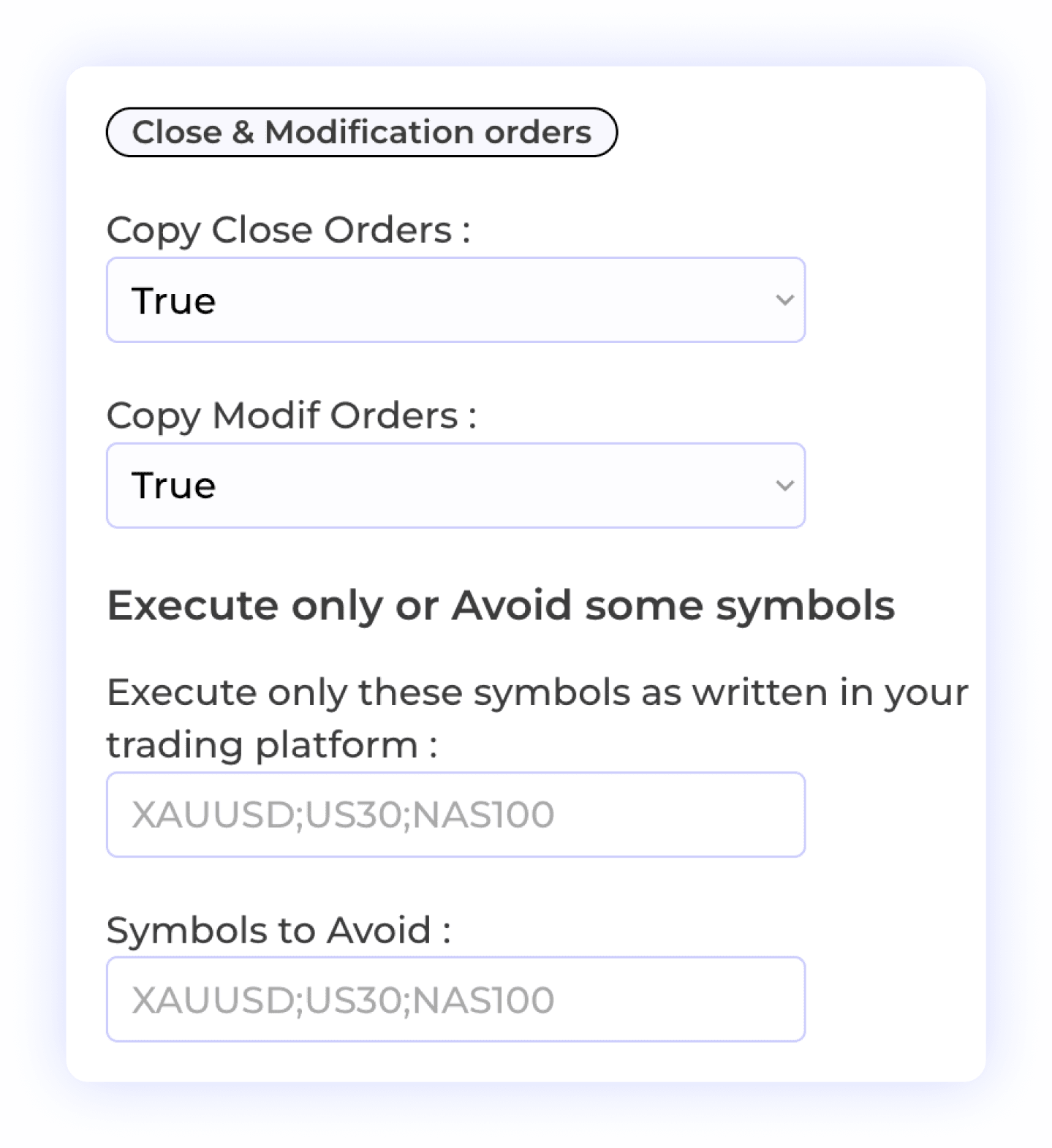
Control exactly how TradingView signals are handled on your TradeLocker account. Allow or block order modifications, partial closures, or specific symbols. This flexibility is crucial for passing prop firm challenges with strict trading rules.

Order Modification

Selective Symbol Copying

Order Closure

Trade Flexibility

Symbol-Specific Lot Exceptions

The Lot Exception feature allows users to set specific lot sizes for individual symbols, providing greater control over their trading strategy. This flexibility enables you to define exceptions based on the characteristics of each symbol, ensuring that your position sizing aligns with your risk management preferences. Customize your trading approach with tailored lot sizes for enhanced precision and effectiveness.

Lot Size Management

Symbol-Specific Settings

Risk Management
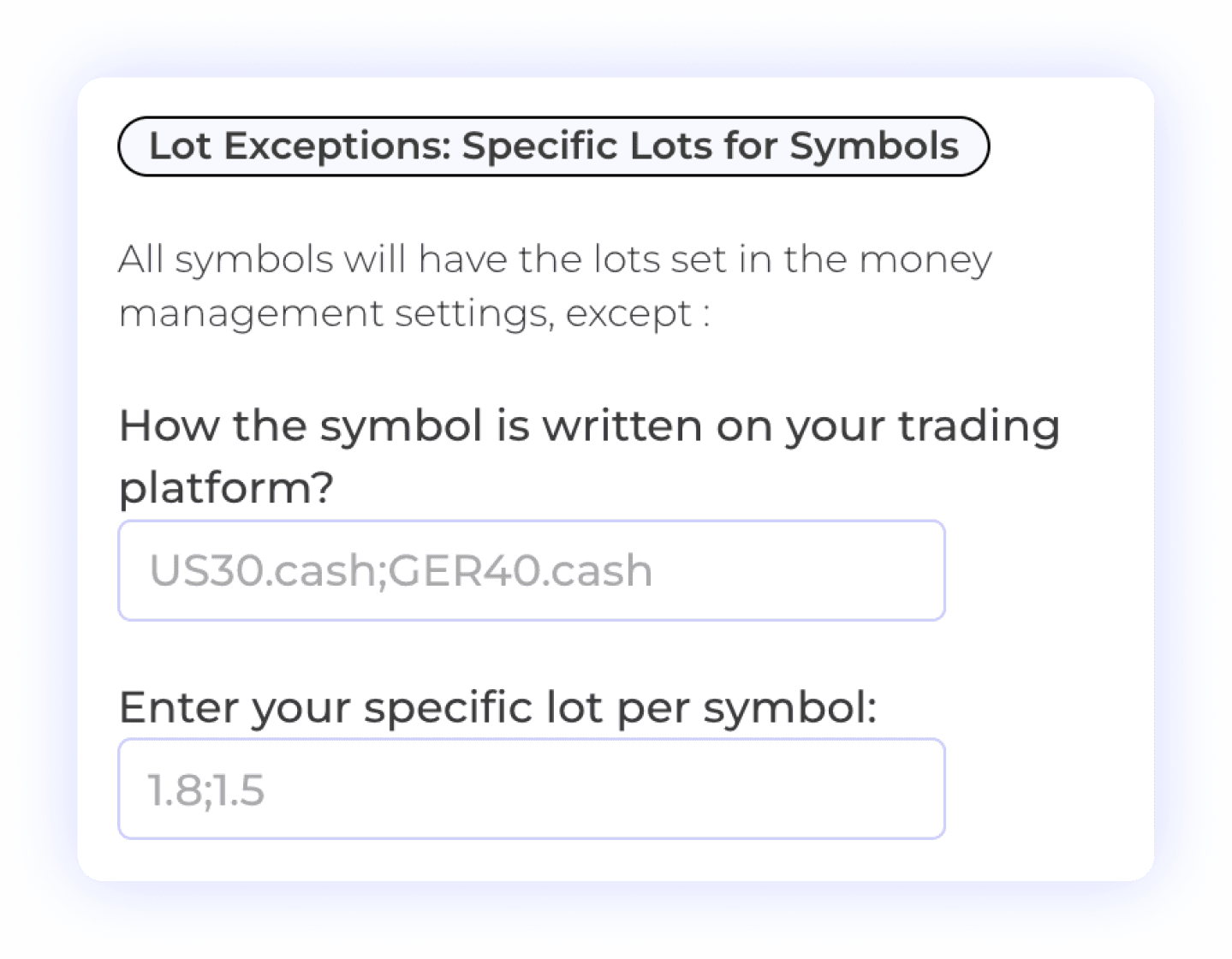
Symbol-Specific Lot Exceptions
Multi-Take Profit Management

Multi-Take Profit Management

The Multiple TPs of Tradingvew Alerts feature allows users to specify distinct Take Profit (TP) levels and corresponding percentage lot sizes for each TP. This option is available for trades coming from Tradingview when the chosen sender is TradingView. By customizing TP settings, you can optimize your profit-taking strategy and manage risk more effectively, tailoring your approach to fit market conditions.

Multiple Take Profits

Lot Size Management

Percent Allocation per TP

User-Controlled Trading

Flexible Time Settings

The Time Settings feature allows users to customize when orders or signals from the sender are executed on the receiver account. You can choose to have trades executed at all times or specify particular time windows for execution. This flexibility helps you align your trading activities with your strategy, ensuring that trades are executed only when it fits your schedule or market conditions.

Time Management

Trade Execution Timing

Automated Trading Control

Flexible Time Settings

Plus 10+ additional settings including AI trade validation, keyword filters, trading schedules, signal vs market price execution, and more. See all features →

COMPARISON

Why Copygram Beats Other TradeLocker Copiers

See how Copygram compares to PickMyTrade, TradingView.to, and DaneTrades on speed, pricing, and ease of use for TradeLocker automation.

Swipe horizontally to compare all tools

Swipe horizontally to compare all tools

Feature & Capability

Feature & Capability

Copygram

Copygram

PickMyTrade

PickMyTrade

TradingView.to

TradingView.to

DaneTrades

DaneTrades

Execution Speed

Execution Speed

< 20ms

< 20ms

< 200ms

< 200ms

Unknown

Unknown

Local network dependent

Local network dependent

Alert Format

Alert Format

Any (AI Parsed)

Any (AI Parsed)

Strict JSON only

Strict JSON only

Strict syntax only

Strict syntax only

Strict format

Strict format

Hosting Required

Hosting Required

Cloud (No VPS)

Cloud (No VPS)

Cloud

Cloud

Cloud

Cloud

Windows PC / VPS

Windows PC / VPS

Price (Starter)

Price (Starter)

$14/month

$14/month

$42/month

$42/month

Varies

Varies

$39/month

$39/month

Multi-Account

Multi-Account

Unlimited (plan-based)

Unlimited (plan-based)

Yes

Yes

Limited

Limited

Yes

Yes

Endless Possibilities

Connect TradingView to Every Major Platform

Say goodbye to multiple tools and hello to efficiency, personalization, and smarter trade copier with our innovative platform.

TradingView to DxTrade

Seamlessly copy trades from TradingView to your DxTrade account. This automation ensures quick execution of your trading alerts, allowing you to act instantly on your strategies!

TradingView to DxTrade

TradingView logo
Copygram logo
Dxtrade Logo
TradingView to Binance Futures

Effortlessly copy trades from TradingView strategy to your Binance Futures account. This automation ensures instant execution of crypto alerts.

TradingView to Binance Futures

TradingView logo
Copygram logo
Binance Logo
TradingView to Metatrader

Automate trades from TradingView to MT4 or MT5. This integration ensures quick execution of your trading strategies, allowing you to manage your trades effortlessly!

TradingView to Metatrader
TradingView logo
Copygram Logo
Metatrader logo
TradingView to Oanda

Seamlessly transfer trades from TradingView to your Oanda account. This automation allows you to receive and execute trading alerts instantly, ensuring you never miss an opportunity.

TradingView to Oanda

TradingView logo
Copygram Logo
Oanda Logo
TradingView to MatchTrader

Automate trades from TradingView to MatchTrader. This integration enables swift execution of your strategies, ensuring seamless trade management across platforms!

TradingView to MatchTrader

TradingView logo
Copygram Logo
Matchtrader logo
TradingView to Tradovate

Route TradingView alerts directly to Tradovate for futures prop firm accounts. OAuth connection, no API keys, and sub-20ms execution.

Tradingview to Tradovate

TradingView logo
Copygram logo
Tradovate Logo
Explore Endless Possibilities

More Automations

  • Detailed Logs

  • Endless Possibilities

  • Webhook Integration

  • Forward Alerts to Multiple Accounts at Once

  • Fast Execution

Pricing Plans

Choose the Perfect Plan for You

Find the right option and start making the most of our all-in-one trade copier platform today!

Save up to 50% by paying yearly (Limited Offer)

Starter

$29

$14

/month

Auto-copy signals from TradingView, MT4, MT5 or Tradovate to your trading account — no VPS needed.

Up to 2 Trading Accounts

Up to 1 Webhook (Usable with TradingView)

Unlimited Trade Executions

Unlimited Rooms

Live Chart Trading

Advanced Trade Logs

Premium Support

Telegram as a Source

AI Trade Validation

Alert Notifications (Telegram & E-mail)

Pro

Most Popular

Copy from any source — Telegram, TradingView, MT4, MT5 or Tradovate — to multiple accounts and brokers.

$49

$24

/month

Up to 3 Trading Accounts

Up to 2 Webhook (Usable with TradingView)

Telegram as a Source (Unlimited Channels & Groups)

Unlimited Trade Executions

Unlimited Rooms

Live Chart Trading

Advanced Trade Logs

Premium Support

AI Trade Validation

Alert Notifications (Telegram & E-mail)

Advanced

Copygram AI

For prop-firm and multi-account traders: copy signals across several funded accounts with AI trade validation.

$79

$39

/month

Up to 5 Trading Accounts

Up to 3 Webhook (Usable with TradingView)

Telegram as a Source (Unlimited Channels & Groups)

AI Trade Validation (New!)

Unlimited Trade Executions

Unlimited Rooms

Live Chart Trading

Alert Notifications (Telegram & E-mail)

Advanced Trade Logs

Premium Support

Pricing Plans

Choose the Perfect Plan for You

Find the right option and start making the most of our all-in-one trade copier platform today!

Save up to 50% by paying yearly (Limited Offer)

Starter

Auto-copy signals from TradingView, MT4, MT5 or Tradovate to your trading account — no VPS needed.

$29

$14

/month

Up to 2 Trading Accounts

Up to 1 Webhook (Usable with TradingView)

Unlimited Trade Executions

Unlimited Rooms

Live Chart Trading

Advanced Trade Logs

Premium Support

Telegram as a Source

AI Trade Validation

Alert Notifications (Telegram & E-mail)

Pro

Most Popular

Copy from any source — Telegram, TradingView, MT4, MT5 or Tradovate — to multiple accounts and brokers.

$49

$24

/month

Up to 3 Trading Accounts

Up to 2 Webhook (Usable with TradingView)

Telegram as a Source (Unlimited Channels & Groups)

Unlimited Trade Executions

Unlimited Rooms

Live Chart Trading

Advanced Trade Logs

Premium Support

AI Trade Validation

Alert Notifications (Telegram & E-mail)

Advanced

For prop-firm and multi-account traders: copy signals across several funded accounts with AI trade validation.

$79

$39

/month

Up to 5 Trading Accounts

Up to 3 Webhook (Usable with TradingView)

Telegram as a Source (Unlimited Channels & Groups)

AI Trade Validation (New!)

Unlimited Trade Executions

Unlimited Rooms

Live Chart Trading

Alert Notifications (Telegram & E-mail)

Advanced Trade Logs

Premium Support

FAQ

TradingView to TradeLocker — Frequently Asked Questions

We’ve gathered all the important info right here. Explore our FAQs and find the answers you need.

How do I automate TradingView alerts to TradeLocker?

You can automate TradingView to TradeLocker by using Copygram's webhook integration. Simply connect your TradeLocker account in Copygram, copy the generated webhook URL, and paste it into the Notifications tab of your TradingView alert. Copygram's AI will parse your alerts and execute them in under 20ms without any coding required.

Does Copygram work with TradeLocker prop firms like FTUK or FundedNext?

Yes, Copygram is fully compatible with all 200+ prop firms and brokers that use the TradeLocker platform, including FTUK, FundedNext, E8 Funding, and AquaFutures. Our risk management features are specifically designed to help you respect prop firm drawdown limits.

Do I need to format my TradingView alerts in JSON?

No. Unlike competitors like PickMyTrade or TradingView.to, Copygram uses AI-powered alert parsing. You can write your alerts in plain English (e.g., "Buy 1 lot EURUSD"), use Pine Script variables, or use standard JSON. Our system understands the intent and executes the trade accurately.

Can I copy one TradingView alert to multiple TradeLocker accounts?

Yes. Copygram allows you to route a single TradingView alert to unlimited TradeLocker accounts simultaneously. You can set different risk multipliers for each account—perfect for scaling funded accounts or managing multiple prop firm challenges at once.

Do I need a VPS to run the TradingView to TradeLocker copier?

No VPS is required. Copygram is a 100% cloud-based platform. Once you set up your webhook, your TradingView alerts will continue to execute on your TradeLocker accounts 24/7, even when your computer is turned off.

Ready to Elevate Your Trading Experience with Copygram?

Unlock the full potential of your trading strategies and automate your success. Join our community of satisfied users and take your trading to the next level with Copygram today!

Copygram Avatar Illustration Robot

Copygram.app

COPYGRAM IS A TOOL DESIGNED FOR ORDER ROUTING, ENABLING USERS TO LINK ALERTS FROM THEIR PREFERRED TRADING PLATFORM TO THEIR CHOSEN BROKERAGE OR EXCHANGE ACCOUNT. COPYGRAM ITSELF DOES NOT PROVIDE ALERTS, SIGNALS, RESEARCH, ANALYSIS, OR ANY TRADING ADVICE. THE PURPOSE OF THE COPYGRAM PLATFORM IS TO SUPPORT TRADERS AND INVESTORS IN CARRYING OUT THEIR TRADING CHOICES BASED ON THEIR OWN ALERTS OR STRATEGIES. WE DO NOT SUGGEST ANY SPECIFIC SECURITIES FOR BUYING OR SELLING AND DO NOT GIVE TRADING OR INVESTING ADVICE. OUR PLATFORM, INCLUDING ITS FEATURES, CAPABILITIES, AND TOOLS, IS OFFERED ‘AS IS’ WITHOUT WARRANTY. TRADING ANY ASSET CARRIES SIGNIFICANT RISK AND MAY NOT BE SUITABLE FOR ALL INDIVIDUALS. IT IS ADVISABLE TO TRADE OR INVEST ONLY WITH FUNDS YOU CAN AFFORD TO LOSE.

Ready to Elevate Your Trading Experience with Copygram?

Unlock the full potential of your trading strategies and automate your success. Join our community of satisfied users and take your trading to the next level with Copygram today!

Copygram Avatar Illustration Robot

Copygram.app

COPYGRAM IS A TOOL DESIGNED FOR ORDER ROUTING, ENABLING USERS TO LINK ALERTS FROM THEIR PREFERRED TRADING PLATFORM TO THEIR CHOSEN BROKERAGE OR EXCHANGE ACCOUNT. COPYGRAM ITSELF DOES NOT PROVIDE ALERTS, SIGNALS, RESEARCH, ANALYSIS, OR ANY TRADING ADVICE. THE PURPOSE OF THE COPYGRAM PLATFORM IS TO SUPPORT TRADERS AND INVESTORS IN CARRYING OUT THEIR TRADING CHOICES BASED ON THEIR OWN ALERTS OR STRATEGIES. WE DO NOT SUGGEST ANY SPECIFIC SECURITIES FOR BUYING OR SELLING AND DO NOT GIVE TRADING OR INVESTING ADVICE. OUR PLATFORM, INCLUDING ITS FEATURES, CAPABILITIES, AND TOOLS, IS OFFERED ‘AS IS’ WITHOUT WARRANTY. TRADING ANY ASSET CARRIES SIGNIFICANT RISK AND MAY NOT BE SUITABLE FOR ALL INDIVIDUALS. IT IS ADVISABLE TO TRADE OR INVEST ONLY WITH FUNDS YOU CAN AFFORD TO LOSE.

Ready to Elevate Your Trading Experience with Copygram?

Unlock the full potential of your trading strategies and automate your success. Join our community of satisfied users and take your trading to the next level with Copygram today!

Copygram Avatar Illustration Robot

Copygram.app

COPYGRAM IS A TOOL DESIGNED FOR ORDER ROUTING, ENABLING USERS TO LINK ALERTS FROM THEIR PREFERRED TRADING PLATFORM TO THEIR CHOSEN BROKERAGE OR EXCHANGE ACCOUNT. COPYGRAM ITSELF DOES NOT PROVIDE ALERTS, SIGNALS, RESEARCH, ANALYSIS, OR ANY TRADING ADVICE. THE PURPOSE OF THE COPYGRAM PLATFORM IS TO SUPPORT TRADERS AND INVESTORS IN CARRYING OUT THEIR TRADING CHOICES BASED ON THEIR OWN ALERTS OR STRATEGIES. WE DO NOT SUGGEST ANY SPECIFIC SECURITIES FOR BUYING OR SELLING AND DO NOT GIVE TRADING OR INVESTING ADVICE. OUR PLATFORM, INCLUDING ITS FEATURES, CAPABILITIES, AND TOOLS, IS OFFERED ‘AS IS’ WITHOUT WARRANTY. TRADING ANY ASSET CARRIES SIGNIFICANT RISK AND MAY NOT BE SUITABLE FOR ALL INDIVIDUALS. IT IS ADVISABLE TO TRADE OR INVEST ONLY WITH FUNDS YOU CAN AFFORD TO LOSE.